You set up the campaign, the clicks are coming in, the cost per click looks fine. Then you check your inbox and there is nothing. No form fills, no calls, no messages. It is easy to decide that Facebook ads just don’t work for a business like yours.
Facebook ads not getting leads is a common complaint, and the ads themselves are rarely the whole problem. What usually fails is one of the links in the chain between the click and the enquiry. The good news is that most of these breaks are easy to find once you know where to look. Here are the seven I check first, in the order I check them.
First, check it really is a lead problem
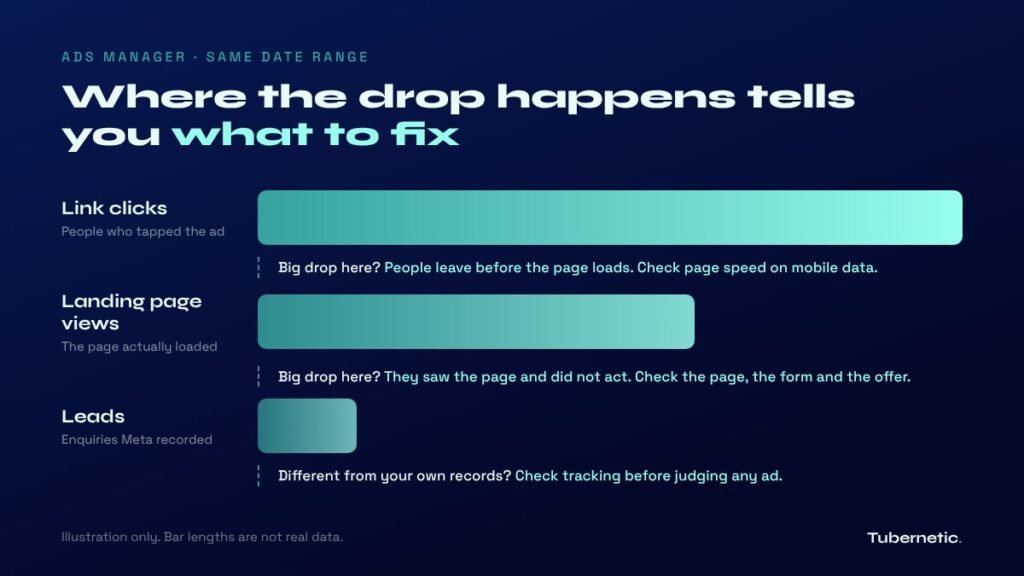
Before changing anything, open Ads Manager and compare three numbers for the same date range: link clicks, landing page views and leads (or whatever your result is called). Each gap tells you something different.
- Lots of clicks, far fewer landing page views: people are leaving before your page even loads. That points at page speed or accidental taps.
- Plenty of landing page views, no leads: people are seeing your page and deciding not to act. That points at the page, the form or the offer.
- Leads showing in your CRM or inbox but not in Ads Manager: the ads may be working fine and your tracking is broken.
- More leads in Ads Manager than in your own records: the reverse happens too, and it is arguably worse. You can no longer tell which ad produced which enquiry, so you end up guessing which creative to keep.
Knowing which of these you have saves you from fixing the wrong thing.
1. The campaign is optimising for clicks, not enquiries
This is the most common reason for Facebook ads not getting leads that I see. When you pick the Traffic objective, Meta does exactly what you asked: it finds people who are likely to click. Those are not the same people who are likely to fill in a form. Some people click on almost everything.
If you want enquiries, use the Leads objective and optimise for the action you actually want, such as a form submission on your website or an Instant Form lead. Meta can only find more of the people you tell it you want.
2. Your tracking is broken, so Meta is flying blind
If the Meta Pixel and Conversions API are not reporting your leads correctly, the campaign can’t learn who converts. It keeps spending, but it is guessing. Worse, you may be getting leads and simply not seeing them in your reports, so you switch off an ad that was working.
Open Events Manager, use Test Events, and submit your own form. You should see the lead event arrive within a minute or two. If it doesn’t, fix that before you judge any campaign.
Broken tracking does not always look broken. On one account, Meta was reporting 78 leads for the month while the website’s own enquiry log could only match 72 of them to the campaign. The missing six were real people. The form was recording the page URL at the moment someone pressed submit, so anyone who landed on the ad’s page, read for a while, clicked through to another page and then enquired arrived with no campaign data attached at all. Nothing was wrong with the ads. The reporting simply could not see part of what they had produced.
If your form only records the page someone submits from, save the campaign details when a visitor first arrives and send them along with the form, wherever on the site they end up enquiring.
It also helps to know how much data Meta needs. According to Meta’s Business Help Center, an ad set generally needs about 50 optimisation events within seven days of its last significant edit to exit the learning phase. With a small budget you may never hit that, which is one reason to keep the number of ad sets low and avoid editing them every day.
3. The ad sends people to the wrong page
Sending ad traffic to your home page is a common leak. Someone clicked on an ad about one specific service, and now they have to work out where to go. Most won’t bother.
Send each ad to a page about exactly what the ad promised, with the enquiry form or phone number visible without scrolling on a phone. The headline on the page should match the ad closely enough that people know they are in the right place.
4. The page is slow or awkward on a phone
Almost all of your Facebook and Instagram traffic is on mobile. If the page takes several seconds to load on a mobile connection, a good share of the people you paid for are gone before they see anything. That is the gap between link clicks and landing page views showing up.
Test your page on your own phone using mobile data, not office wifi. Then run it through Google PageSpeed Insights and fix the biggest items first, which are usually oversized images and too many plugins or scripts.
5. The form asks for too much, too soon
Every extra field is another reason to stop. For a first enquiry you usually need a name, a way to contact them, and one or two questions that tell you whether they are a fit. Budget, address and a long project description can wait for the conversation.
The exception is when you are getting plenty of leads but they are poor quality. Then one well chosen extra question can actually help, because it filters out people who were never going to buy.
On my forms I mostly ask for a name, an email or a phone number and a short message, and nothing else. The message box earns its place. It is the one field that tells me whether someone has a specific problem in mind or is just looking around, and it is the first thing I sort by when I am assessing whether a campaign is bringing in the right people rather than just a lot of people. A month with forty vague enquiries is worth less than a month with twenty where people describe their situation.
6. The offer gives no reason to act now
“Contact us for a quote” asks people to do work for an unknown outcome. Compare that with a clear, specific next step: a free 15 minute call, a fixed price starting point, a short checklist, or a same day reply. People act when they can picture what happens after they press the button.
Showing prices helps too. A visitor who can see roughly what something costs is far more likely to enquire than one who suspects the number will be scary.
7. The leads arrive, but nobody follows up fast
This one is easy to miss because it looks like an ads problem but isn’t. If a lead waits a day for a reply, they have often already booked someone else. Leads go cold quickly.
Make sure every enquiry reaches you instantly and somewhere you actually look. Check that your website’s notification emails are really being delivered and not quietly failing or landing in spam. I found exactly this on my own site recently: enquiries were being saved, but the email alerts had stopped arriving, and nothing told me. If you can, reply within the hour.
Facebook ads not getting leads? A quick checklist, in order
- Compare link clicks, landing page views and leads to find where people drop off.
- Make sure the campaign objective is Leads, not Traffic or Engagement.
- Test your Pixel and Conversions API in Events Manager with a real form submission.
- Send each ad to a specific page that matches the ad.
- Load that page on your phone using mobile data.
- Cut the form back to the fields you truly need.
- Give people a clear, specific next step.
- Confirm lead notifications arrive instantly, then reply fast.
Work through it in that order. The early steps are quick to check and tend to cause the biggest losses.
When to get help
If you have been through the list and your Facebook ads are still not converting, it is usually a combination of small issues across the ad, the page and the tracking. That is where it helps to have one person look at all three together.
That is exactly how I work with clients: ads, landing page and tracking handled together, so nothing falls between the gaps. You can see my Meta ads rates here, or tell me what you are seeing and I will tell you honestly where I think the leak is.
Frequently asked questions
Should I use Instant Forms or send people to my website?
Instant Forms open inside Facebook and Instagram, so they are quicker to fill in and usually bring in more leads. The trade off is that some of those leads are lower intent, because it takes so little effort. Sending people to your website asks a little more of them but often brings in more serious enquiries. Many businesses test both and compare the leads that actually turn into customers, not just the lead count.
How long should I run ads before deciding they don’t work?
Give a campaign enough time and data to learn before judging it. Meta’s guidance is that an ad set needs about 50 optimisation events within seven days to exit the learning phase, and significant edits restart that process. In practice, avoid making big changes every day, and make sure your tracking is working first, otherwise you are judging on bad data. To check whether your budget is big enough to get there, run your numbers through this Facebook ads budget calculator.
Is boosting a post enough to get leads?
Usually not. The Boost button is built for quick reach and engagement on posts you have already published. For enquiries you get far more control in Ads Manager, including the Leads objective, proper conversion tracking and the ability to test different ads against each other.
Do I need a new website to fix this?
Not always. Often a single focused landing page, a shorter form and working tracking make the difference. A full rebuild only makes sense when the site is genuinely slow, hard to use on a phone, or does not explain what you do clearly.